
Hazelcast Spring Session is a library that allows you to store session information from your Spring Boot application in Hazelcast’s IMap. This allows you to enhance your application with the benefits of Hazelcast: resilence, high availability and high performance.
Update dependencies
If you use Maven, add the following dependencies:
<dependencies>
	<!-- ... -->
	<dependency>
		<groupId>com.hazelcast</groupId>
		<artifactId>hazelcast</artifactId>
		<version>5.7.0-SNAPSHOT</version>
	</dependency>
	<dependency>
		<groupId>org.springframework</groupId>
		<artifactId>spring-web</artifactId>
		<version>7.0.0</version>
	</dependency>
	<dependency>
		<groupId>com.hazelcast</groupId>
		<artifactId>hazelcast-spring-session</artifactId>
		<version>4.0.0</version>
	</dependency>
</dependencies>dependencies {
implementation("com.hazelcast:hazelcast:5.7.0-SNAPSHOT")
implementation("org.springframework:spring-web:7.0.0")
implementation("com.hazelcast:hazelcast-spring-session:4.0.0-RC1")
}| Hazelcast Spring Session uses the same major version number as Spring Boot it was created for. For Spring Boot 4.x, the compatible Hazelcast Spring Session will be always 4.x. |
Migrate from Spring Session Hazelcast 3.x
From version 4.0, the Hazelcast integration with Spring Session is owned by the Hazelcast team.
To migrate your application from using Spring Session Hazelcast 3.x to the new Hazelcast Spring Session 4.x:
-
Change the GroupId to
com.hazelcast.springand artifactId tohazelcast-spring-session. -
Update your code and change the packages. All Hazelcast-specific classes were moved from
org.springframework.session.hazelcasttocom.hazelcast.spring.session. -
Remove this configuration for
PrincipalNameExtractor:AttributeConfig attributeConfig = new AttributeConfig() .setName(Hazelcast4IndexedSessionRepository.PRINCIPAL_NAME_ATTRIBUTE) .setExtractorClassName(Hazelcast4PrincipalNameExtractor.class.getName()); config.getMapConfig(SESSIONS_MAP_NAME) .addAttributeConfig(attributeConfig); -
Change serialization configuration. Replace:
SerializerConfig serializerConfig = new SerializerConfig();
serializerConfig.setImplementation(new HazelcastSessionSerializer()).setTypeClass(MapSession.class);
config.getSerializationConfig().addSerializerConfig(serializerConfig);
With a call:
config = HazelcastSessionConfiguration.applySerializationConfig(config);Note that this call should be made before instance creation (before the call to
Hazelcast.newHazelcastInstance). -
Remove index configuration for
PRINCIPAL_ATTRIBUTE_NAMEif no other IMap customization is wanted; it will be configured automatically. If you want to further customize the session IMap, you can either:-
create
MapConfigmanually and then create an index of typeHASHon theprincipalNameattribute. -
create a bean of type
SessionMapCustomizerto apply your customizations on predefinedMapConfig.
-
List of breaking changes
Spring Session 4.0.0 is a major release. It contains the following breaking changes:
-
Group ID and artifact ID are changed to
com.hazelcast.spring/hazelcast-spring-session. -
The main package name is changed from
org.springframework.session.hazelcasttocom.hazelcast.spring.session. -
Serialization is reworked. It no longer uses an optional
HazelcastSessionSerializer, but relies on Compact Serialization with two new serializers:com.hazelcast.spring.session.AttributeValueCompactSerializerandcom.hazelcast.spring.session.HazelcastSessionCompactSerializer. Additionally, aSessionUpdateEntryProcessorserializer will be configured automatically on server nodes if a JAR is deployed on server nodes. -
The binary representation of the data is changed. Instead of using Spring’s
MapSession, it usescom.hazelcast.spring.session.BackingMapSessionwith attributes stored ascom.hazelcast.spring.session.AttributeValue. This change enables true client-server deployments without the need for any custom code deployment on server nodes for classes used as session attributes. -
Method
void setDefaultMaxInactiveInterval(Integer defaultMaxInactiveInterval)inHazelcastIndexedSessionRepositoryis removed. Use an alternative withDurationas a parameter. -
Most of the setter methods in
HazelcastIndexedSessionRepositorynow returnHazelcastIndexedSessionRepository(this) for fluent API. -
The default logging framework is changed to SLF4J; the default annotations library is now JSpecify.
-
Spring Session now fully supports Java Modules.
Supported topologies
Hazelcast Spring Session supports two topologies.
Client-server
In this topology, the web application uses Hazelcast clients to connect to a Hazelcast cluster on a separate JVM. This may be a completely separate machine. Lite members can optionally be used to on the application side.
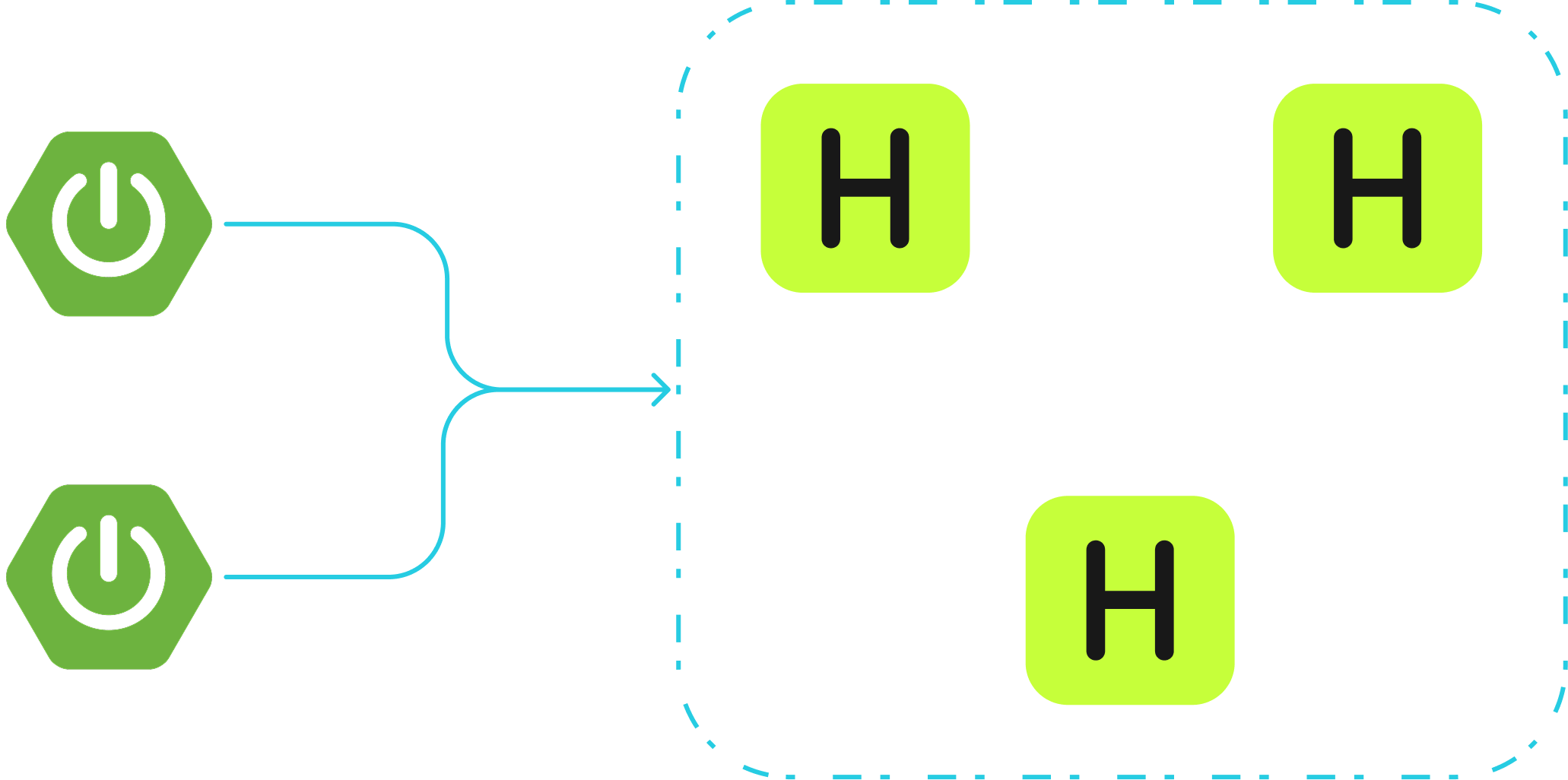
To deploy in a client-server topology:
-
Client side (Spring Boot application):
-
Create a
@Beanof typeClientConfigorHazelcastInstancethat will return the result ofHazelcastClient.newHazelcastClientmethod.
-
-
Server side (Hazelcast member). This configuration is optional, but recommended.
-
Deploy the Hazelcast Spring Session JAR onto the classpath with Spring context and Spring Security JARs.
-
For best performance, add serializers to your Hazelcast configuration:
<serialization>
    <compact-serialization>
        <serializers>
            <serializer>com.hazelcast.spring.session.HazelcastSessionCompactSerializer</serializer>
            <serializer>com.hazelcast.spring.session.AttributeValueCompactSerializer</serializer>
        </serializers>
    </compact-serialization>
</serialization>
serialization: compact-serialization: serializers: - serializer: com.hazelcast.spring.session.HazelcastSessionCompactSerializer - serializer: com.hazelcast.spring.session.AttributeValueCompactSerializerimport com.hazelcast.spring.session.AttributeValueCompactSerializer; import com.hazelcast.spring.session.HazelcastSessionCompactSerializer; // ... config.getSerializationConfig().getCompactSerializationConfig() .addSerializer(new AttributeValueCompactSerializer()) .addSerializer(new HazelcastSessionCompactSerializer());Alternatively, you can use the helper method:
import com.hazelcast.spring.session.HazelcastSessionConfiguration; // ... HazelcastSessionConfiguration.applySerializationConfig(config);
-
Embedded
In this topology, every web application instance has an embedded Hazelcast instance. Data is stored on the same JVMs as the application.
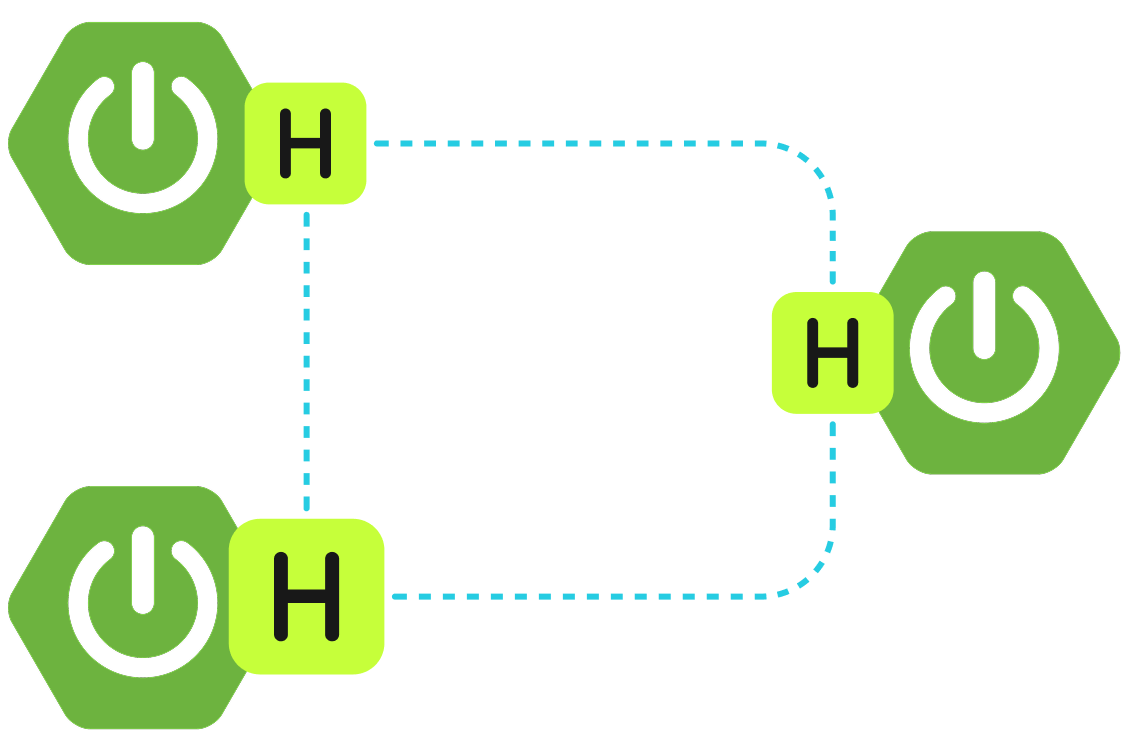
This topology is the easiest to start with as it does not require separate cluster JVMs, however it is less flexible because Hazelcast members scale with application instances.
To deploy in an embedded topology, you must configure serialization:
You can use the helper method (recommended):
import com.hazelcast.spring.session.HazelcastSessionConfiguration;
// ...
HazelcastSessionConfiguration.applySerializationConfig(config);Alternatively, you can add specific serializers manually:
import com.hazelcast.spring.session.AttributeValueCompactSerializer;
import com.hazelcast.spring.session.HazelcastSessionCompactSerializer;
// ...
config.getSerializationConfig().getCompactSerializationConfig()
            .addSerializer(new AttributeValueCompactSerializer())
.addSerializer(new HazelcastSessionCompactSerializer());<serialization>
<compact-serialization>
<serializers>
<serializer>com.hazelcast.spring.session.HazelcastSessionCompactSerializer</serializer>
<serializer>com.hazelcast.spring.session.AttributeValueCompactSerializer</serializer>
</serializers>
</compact-serialization>
</serialization>serialization:
compact-serialization:
serializers:
- serializer: com.hazelcast.spring.session.HazelcastSessionCompactSerializer
- serializer: com.hazelcast.spring.session.AttributeValueCompactSerializerConfigure Spring
Configure Spring to create a servlet filter that replaces the HttpSession implementation with an implementation backed by Spring Session. Add the following Spring Configuration:
@EnableHazelcastHttpSession (1)
@Configuration
public class HazelcastHttpSessionConfig {

	@Bean
	public HazelcastInstance hazelcastInstance() {
		Config config = new Config();
		HazelcastSessionConfiguration.applySerializationConfig(config); (2)
		config.getMapConfig(HazelcastIndexedSessionRepository.DEFAULT_SESSION_MAP_NAME) (3)
			.addIndexConfig(
					new IndexConfig(IndexType.HASH, HazelcastIndexedSessionRepository.PRINCIPAL_NAME_ATTRIBUTE));
		return Hazelcast.newHazelcastInstance(config); (4)
	}

}| 1 | The @EnableHazelcastHttpSession annotation creates a Spring bean named springSessionRepositoryFilter that implements Filter.
The filter replaces the HttpSession implementation to be backed by Spring Session.
In this instance, Spring Session is backed by Hazelcast. |
| 2 | To serialize BackingMapSession objects efficiently, HazelcastSessionCompactSerializer and AttributeValueCompactSerializer needs to be registered. If this is not set, Hazelcast won’t be able to deserialize session data. |
| 3 | For best performance when using Hazelcast Spring Session with Spring Security, an index on HazelcastIndexedSessionRepository.PRINCIPAL_NAME_ATTRIBUTE must be added. This step is optional in Hazelcast Spring Session 4.0, as HazelcastIndexedSessionRepository will try to add this index automatically. If you want to customize your MapConfig, you need to add this index manually as overriding MapConfig by HazelcastIndexedSessionRepository is not possible. |
| 4 | Create a HazelcastInstance that connects Spring Session to Hazelcast.
By default, the application starts and connects to an embedded instance of Hazelcast. |
Customization options
To customize the SessionRepository your application will be using, declare a bean of type SessionRepositoryCustomizer<HazelcastIndexedSessionRepository>. For example:
@Bean
public SessionRepositoryCustomizer<HazelcastIndexedSessionRepository> customizeSessionRepo() {
    return (sessionRepository) -> {
        // here you can customize sessionRepository by calling the setter methods, for example:
        sessionRepository.setFlushMode(FlushMode.IMMEDIATE);
        sessionRepository.setSaveMode(SaveMode.ALWAYS);
        sessionRepository.setDeployedOnAllMembers(false);
    };
}
The following table describes some common customization options:
| Method/property | Default value | Description |
|---|---|---|
|
|
When changes in the session will be persisted. Possible options: - |
|
|
Maximum inactive interval in between requests before the session will be invalidated. A negative time indicates that the session will never time out. |
|
|
Name of IMap used to store sessions. |
|
|
When changes to session attributes will be saved. Possible values: - |
|
|
IndexResolver to use when querying for |
|
|
How session IDs for new sessions are generated. |
|
|
Allows setting a custom ApplicationEventPublisher that will be used to publish |
|
|
If called, the autoconfiguration of IMap storing session data won’t be performed and index on |
|
|
Customizes session map configuration (MapConfig). If using client-server architecture, the customized |