
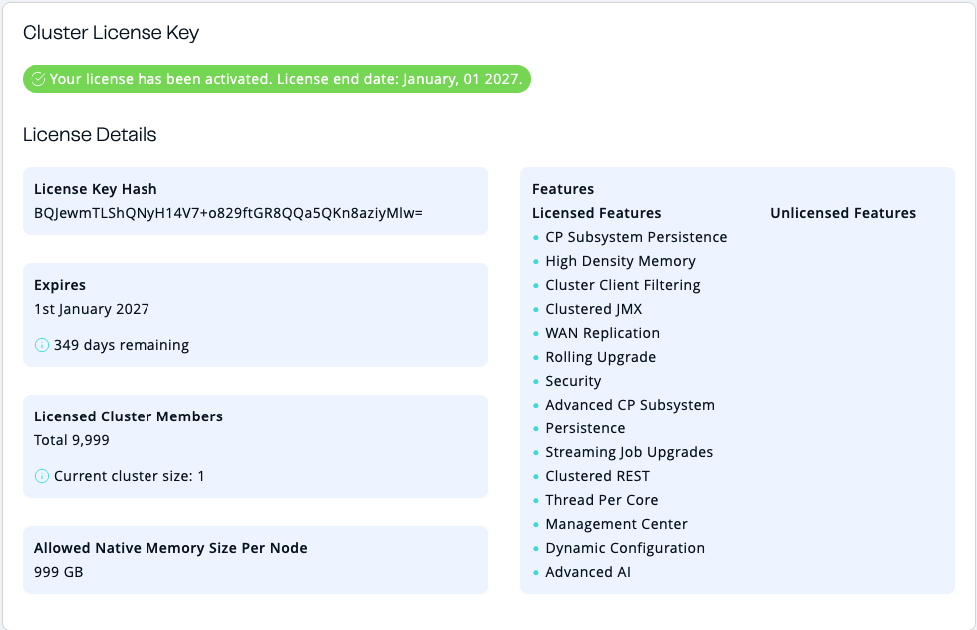
You can use the Cluster License tab of the Administration menu item to see details about your cluster’s license.
This page is available only to admin users.
-
License Key Hash: SHA-256 hash of the key as a Base64 encoded string. The actual key is not displayed for security reasons.
-
Expires: The date on which the license will expire.
-
Licensed Cluster Members: The total number of members that the license supports and the current number of members running on the license.
-
Allowed Native Memory Size Per Node: Allowed size of Native Memory, if the license includes High Density Memory feature.
Warnings are displayed when a license expires within 30 days.
Related resources
Even if members are installed with a license, you cannot use Enterprise features in Management Center until you install the license on Management Center as well. See Enterprise licenses.
For information about cluster licenses, see Manage Enterprise Edition license keys in the Platform documentation.